Call Now

MacBook Repair in Ruislip – Screens, Batteries & Keyboards

Cracked or black screen, a battery that says Service Recommended, keys that stopped working, or a MacBook that won't charge or switch on? Tech Fix and Trade repairs MacBook Air and MacBook Pro, Intel and Apple silicon, at 68 High Street, Ruislip, with a free diagnosis before any work starts.

  • Cracked screen
  • Lines or flicker
  • Service Recommended
  • Keyboard faults
  • Not charging
  • Liquid spill
  • Won't turn on
  • Logic board faults

Free diagnosis · No fix, no fee · Message us on WhatsApp

  • 🔬Free diagnosis
  • 🛡️No fix, no fee
  • 🖥️Screens in 1 to 2 days
  • 🔋Batteries same day
  • ✅3 month warranty

MacBook model checker

Find Your MacBook Model

Enter the model number from the bottom of your MacBook to see exactly which one you have, and what we can fix on it.

Works with model numbers like A2337, names like MacBook Air M1 or M1 2020, and Model Identifiers like MacBookPro17,1.

48 verified MacBook Air and MacBook Pro models, 2012 to 2026.

MacBook Model Number Lookup

Every MacBook in our checker, with the facts that matter for a repair. Names, years and Model Identifiers come from Apple's own identification pages, and each A number has been cross checked against two independent hardware references before going on this list.

MacBook Air model numbers

A3449

MacBook Air (13-inch, M5)

2026 · 13.6 inch · Apple M5 · Mac17,3

A3449 is the MacBook Air (13-inch, M5), a 13.6 inch model with the Apple M5 chip, introduced in 2026. Charging: MagSafe 3 or USB-C. Still gets the latest macOS (macOS 27, released September 2026).

A3448

MacBook Air (15-inch, M5)

2026 · 15.3 inch · Apple M5 · Mac17,4

A3448 is the MacBook Air (15-inch, M5), a 15.3 inch model with the Apple M5 chip, introduced in 2026. Charging: MagSafe 3 or USB-C. Still gets the latest macOS (macOS 27, released September 2026).

A3240

MacBook Air (13-inch, M4, 2025)

2025 · 13.6 inch · Apple M4 · Mac16,12

A3240 is the MacBook Air (13-inch, M4, 2025), a 13.6 inch model with the Apple M4 chip, introduced in 2025. Charging: MagSafe 3 or USB-C. Still gets the latest macOS (macOS 27, released September 2026).

A3241

MacBook Air (15-inch, M4, 2025)

2025 · 15.3 inch · Apple M4 · Mac16,13

A3241 is the MacBook Air (15-inch, M4, 2025), a 15.3 inch model with the Apple M4 chip, introduced in 2025. Charging: MagSafe 3 or USB-C. Still gets the latest macOS (macOS 27, released September 2026).

A3113

MacBook Air (13-inch, M3, 2024)

2024 · 13.6 inch · Apple M3 · Mac15,12

A3113 is the MacBook Air (13-inch, M3, 2024), a 13.6 inch model with the Apple M3 chip, introduced in 2024. Charging: MagSafe 3 or USB-C. Still gets the latest macOS (macOS 27, released September 2026).

A3114

MacBook Air (15-inch, M3, 2024)

2024 · 15.3 inch · Apple M3 · Mac15,13

A3114 is the MacBook Air (15-inch, M3, 2024), a 15.3 inch model with the Apple M3 chip, introduced in 2024. Charging: MagSafe 3 or USB-C. Still gets the latest macOS (macOS 27, released September 2026).

A2941

MacBook Air (15-inch, M2, 2023)

2023 · 15.3 inch · Apple M2 · Mac14,15

A2941 is the MacBook Air (15-inch, M2, 2023), a 15.3 inch model with the Apple M2 chip, introduced in 2023. Charging: MagSafe 3 or USB-C. Still gets the latest macOS (macOS 27, released September 2026).

A2681

MacBook Air (M2, 2022)Common in our shop

2022 · 13.6 inch · Apple M2 · Mac14,2

A2681 is the MacBook Air (M2, 2022), a 13.6 inch model with the Apple M2 chip, introduced in 2022. Charging: MagSafe 3 or USB-C. Still gets the latest macOS (macOS 27, released September 2026).

A2337

MacBook Air (M1, 2020)Common in our shop

2020 · 13.3 inch · Apple M1 · MacBookAir10,1

A2337 is the MacBook Air (M1, 2020), a 13.3 inch model with the Apple M1 chip, introduced in 2020. Charging: USB-C. Still gets the latest macOS (macOS 27, released September 2026).

A2179

MacBook Air (Retina, 13-inch, 2020)

2020 · 13.3 inch · Intel Core i3, i5 or i7 · MacBookAir9,1

A2179 is the MacBook Air (Retina, 13-inch, 2020), a 13.3 inch model with the Intel Core i3, i5 or i7 chip, introduced in 2020. Charging: USB-C. Can't run macOS Tahoe or 27. It stops at macOS Sequoia 15, which is in its last year of security fixes.

A1932

MacBook Air (Retina, 13-inch, 2019)

2019 · 13.3 inch · Intel Core i5 · MacBookAir8,2

A1932 is used on more than one MacBook. This one is the MacBook Air (Retina, 13-inch, 2019), a 13.3 inch model with the Intel Core i5 chip, introduced in 2019. Charging: USB-C. Stops at macOS Sonoma 14, which Apple no longer updates.

A1932

MacBook Air (Retina, 13-inch, 2018)

2018 · 13.3 inch · Intel Core i5 · MacBookAir8,1

A1932 is also used on the MacBook Air (Retina, 13-inch, 2018), a 13.3 inch model with the Intel Core i5 chip, introduced in 2018. Charging: USB-C. Stops at macOS Sonoma 14, which Apple no longer updates.

A1466

MacBook Air (13-inch), Mid 2012 to 2017

2012 to 2017 · 13.3 inch · Intel Core i5 or i7 · MacBookAir5,2 / MacBookAir6,2 / MacBookAir7,2

A1466 covers these Apple models: MacBook Air (13-inch, Mid 2012), MacBook Air (13-inch, Mid 2013), MacBook Air (13-inch, Early 2014), MacBook Air (13-inch, Early 2015), MacBook Air (13-inch, 2017). Charging: MagSafe 2. No longer gets macOS or security updates from Apple.

MacBook Pro model numbers

A3426

MacBook Pro (14-inch, M5 Pro or M5 Max)

2026 · 14.2 inch · Apple M5 Pro · Mac17,7 / Mac17,9

A3426 is the MacBook Pro (14-inch, M5 Pro or M5 Max), a 14.2 inch model with the Apple M5 Pro chip, introduced in 2026. Charging: MagSafe 3 or USB-C. Still gets the latest macOS (macOS 27, released September 2026).

A3427

MacBook Pro (14-inch, M5 Pro or M5 Max)

2026 · 14.2 inch · Apple M5 Max · Mac17,7 / Mac17,9

A3427 is the MacBook Pro (14-inch, M5 Pro or M5 Max), a 14.2 inch model with the Apple M5 Max chip, introduced in 2026. Charging: MagSafe 3 or USB-C. Still gets the latest macOS (macOS 27, released September 2026).

A3428

MacBook Pro (16-inch, M5 Pro or M5 Max)

2026 · 16.2 inch · Apple M5 Pro · Mac17,6 / Mac17,8

A3428 is the MacBook Pro (16-inch, M5 Pro or M5 Max), a 16.2 inch model with the Apple M5 Pro chip, introduced in 2026. Charging: MagSafe 3 or USB-C. Still gets the latest macOS (macOS 27, released September 2026).

A3429

MacBook Pro (16-inch, M5 Pro or M5 Max)

2026 · 16.2 inch · Apple M5 Max · Mac17,6 / Mac17,8

A3429 is the MacBook Pro (16-inch, M5 Pro or M5 Max), a 16.2 inch model with the Apple M5 Max chip, introduced in 2026. Charging: MagSafe 3 or USB-C. Still gets the latest macOS (macOS 27, released September 2026).

A3434

MacBook Pro (14-inch, M5)

2025 · 14.2 inch · Apple M5 · Mac17,2

A3434 is the MacBook Pro (14-inch, M5), a 14.2 inch model with the Apple M5 chip, introduced in 2025. Charging: MagSafe 3 or USB-C. Still gets the latest macOS (macOS 27, released September 2026).

A3112

MacBook Pro (14-inch, M4, 2024)

2024 · 14.2 inch · Apple M4 · Mac16,1

A3112 is the MacBook Pro (14-inch, M4, 2024), a 14.2 inch model with the Apple M4 chip, introduced in 2024. Charging: MagSafe 3 or USB-C. Still gets the latest macOS (macOS 27, released September 2026).

A3401

MacBook Pro (14-inch, M4 Pro or M4 Max, 2024)

2024 · 14.2 inch · Apple M4 Pro · Mac16,6 / Mac16,8

A3401 is the MacBook Pro (14-inch, M4 Pro or M4 Max, 2024), a 14.2 inch model with the Apple M4 Pro chip, introduced in 2024. Charging: MagSafe 3 or USB-C. Still gets the latest macOS (macOS 27, released September 2026).

A3185

MacBook Pro (14-inch, M4 Pro or M4 Max, 2024)

2024 · 14.2 inch · Apple M4 Max · Mac16,6 / Mac16,8

A3185 is the MacBook Pro (14-inch, M4 Pro or M4 Max, 2024), a 14.2 inch model with the Apple M4 Max chip, introduced in 2024. Charging: MagSafe 3 or USB-C. Still gets the latest macOS (macOS 27, released September 2026).

A3403

MacBook Pro (16-inch, 2024)

2024 · 16.2 inch · Apple M4 Pro · Mac16,5 / Mac16,7

A3403 is the MacBook Pro (16-inch, 2024), a 16.2 inch model with the Apple M4 Pro chip, introduced in 2024. Charging: MagSafe 3 or USB-C. Still gets the latest macOS (macOS 27, released September 2026).

A3186

MacBook Pro (16-inch, 2024)

2024 · 16.2 inch · Apple M4 Max · Mac16,5 / Mac16,7

A3186 is the MacBook Pro (16-inch, 2024), a 16.2 inch model with the Apple M4 Max chip, introduced in 2024. Charging: MagSafe 3 or USB-C. Still gets the latest macOS (macOS 27, released September 2026).

A2918

MacBook Pro (14-inch, M3, Nov 2023)

2023 · 14.2 inch · Apple M3 · Mac15,3

A2918 is the MacBook Pro (14-inch, M3, Nov 2023), a 14.2 inch model with the Apple M3 chip, introduced in 2023. Charging: MagSafe 3 or USB-C. Still gets the latest macOS (macOS 27, released September 2026).

A2992

MacBook Pro (14-inch, M3 Pro or M3 Max, Nov 2023)

2023 · 14.2 inch · Apple M3 Pro or M3 Max · Mac15,6 / Mac15,8 / Mac15,10

A2992 is the MacBook Pro (14-inch, M3 Pro or M3 Max, Nov 2023), a 14.2 inch model with the Apple M3 Pro or M3 Max chip, introduced in 2023. Charging: MagSafe 3 or USB-C. Still gets the latest macOS (macOS 27, released September 2026).

A2991

MacBook Pro (16-inch, Nov 2023)

2023 · 16.2 inch · Apple M3 Pro or M3 Max · Mac15,7 / Mac15,9 / Mac15,11

A2991 is the MacBook Pro (16-inch, Nov 2023), a 16.2 inch model with the Apple M3 Pro or M3 Max chip, introduced in 2023. Charging: MagSafe 3 or USB-C. Still gets the latest macOS (macOS 27, released September 2026).

A2779

MacBook Pro (14-inch, 2023)

2023 · 14.2 inch · Apple M2 Pro or M2 Max · Mac14,5 / Mac14,9

A2779 is the MacBook Pro (14-inch, 2023), a 14.2 inch model with the Apple M2 Pro or M2 Max chip, introduced in 2023. Charging: MagSafe 3 or USB-C. Still gets the latest macOS (macOS 27, released September 2026).

A2780

MacBook Pro (16-inch, 2023)

2023 · 16.2 inch · Apple M2 Pro or M2 Max · Mac14,6 / Mac14,10

A2780 is the MacBook Pro (16-inch, 2023), a 16.2 inch model with the Apple M2 Pro or M2 Max chip, introduced in 2023. Charging: MagSafe 3 or USB-C. Still gets the latest macOS (macOS 27, released September 2026).

A2338

MacBook Pro (13-inch, M2, 2022)

2022 · 13.3 inch · Apple M2 · Mac14,7

A2338 is used on more than one MacBook. This one is the MacBook Pro (13-inch, M2, 2022), a 13.3 inch model with the Apple M2 chip, introduced in 2022. Charging: USB-C. Still gets the latest macOS (macOS 27, released September 2026).

A2338

MacBook Pro (13-inch, M1, 2020)Common in our shop

2020 · 13.3 inch · Apple M1 · MacBookPro17,1

A2338 is also used on the MacBook Pro (13-inch, M1, 2020), a 13.3 inch model with the Apple M1 chip, introduced in 2020. Charging: USB-C. Still gets the latest macOS (macOS 27, released September 2026).

A2442

MacBook Pro (14-inch, 2021)Common in our shop

2021 · 14.2 inch · Apple M1 Pro or M1 Max · MacBookPro18,3 / MacBookPro18,4

A2442 is the MacBook Pro (14-inch, 2021), a 14.2 inch model with the Apple M1 Pro or M1 Max chip, introduced in 2021. Charging: MagSafe 3 or USB-C. Still gets the latest macOS (macOS 27, released September 2026).

A2485

MacBook Pro (16-inch, 2021)Common in our shop

2021 · 16.2 inch · Apple M1 Pro or M1 Max · MacBookPro18,1 / MacBookPro18,2

A2485 is the MacBook Pro (16-inch, 2021), a 16.2 inch model with the Apple M1 Pro or M1 Max chip, introduced in 2021. Charging: MagSafe 3 or USB-C. Still gets the latest macOS (macOS 27, released September 2026).

A2251

MacBook Pro (13-inch, 2020, Four Thunderbolt 3 ports)

2020 · 13.3 inch · Intel Core i5 or i7 · MacBookPro16,2

A2251 is the MacBook Pro (13-inch, 2020, Four Thunderbolt 3 ports), a 13.3 inch model with the Intel Core i5 or i7 chip, introduced in 2020. Charging: USB-C. Can't run macOS 27. It stops at macOS Tahoe 26, which now gets security fixes only.

A2289

MacBook Pro (13-inch, 2020, Two Thunderbolt 3 ports)

2020 · 13.3 inch · Intel Core i5 or i7 · MacBookPro16,3

A2289 is the MacBook Pro (13-inch, 2020, Two Thunderbolt 3 ports), a 13.3 inch model with the Intel Core i5 or i7 chip, introduced in 2020. Charging: USB-C. Can't run macOS Tahoe or 27. It stops at macOS Sequoia 15, which is in its last year of security fixes.

A2141

MacBook Pro (16-inch, 2019)

2019 · 16 inch · Intel Core i7 or i9 · MacBookPro16,1 / MacBookPro16,4

A2141 is the MacBook Pro (16-inch, 2019), a 16 inch model with the Intel Core i7 or i9 chip, introduced in 2019. Charging: USB-C. Can't run macOS 27. It stops at macOS Tahoe 26, which now gets security fixes only.

A2159

MacBook Pro (13-inch, 2019, Two Thunderbolt 3 ports)

2019 · 13.3 inch · Intel Core i5 or i7 · MacBookPro15,4

A2159 is the MacBook Pro (13-inch, 2019, Two Thunderbolt 3 ports), a 13.3 inch model with the Intel Core i5 or i7 chip, introduced in 2019. Charging: USB-C. Can't run macOS Tahoe or 27. It stops at macOS Sequoia 15, which is in its last year of security fixes.

A1989

MacBook Pro (13-inch, 2019, Four Thunderbolt 3 ports)

2019 · 13.3 inch · Intel Core i5 or i7 · MacBookPro15,2

A1989 is used on more than one MacBook. This one is the MacBook Pro (13-inch, 2019, Four Thunderbolt 3 ports), a 13.3 inch model with the Intel Core i5 or i7 chip, introduced in 2019. Charging: USB-C. Can't run macOS Tahoe or 27. It stops at macOS Sequoia 15, which is in its last year of security fixes.

A1989

MacBook Pro (13-inch, 2018, Four Thunderbolt 3 ports)

2018 · 13.3 inch · Intel Core i5 or i7 · MacBookPro15,2

A1989 is also used on the MacBook Pro (13-inch, 2018, Four Thunderbolt 3 ports), a 13.3 inch model with the Intel Core i5 or i7 chip, introduced in 2018. Charging: USB-C. Can't run macOS Tahoe or 27. It stops at macOS Sequoia 15, which is in its last year of security fixes.

A1990

MacBook Pro (15-inch, 2019)

2019 · 15.4 inch · Intel Core i7 or i9 · MacBookPro15,1 / MacBookPro15,3

A1990 is used on more than one MacBook. This one is the MacBook Pro (15-inch, 2019), a 15.4 inch model with the Intel Core i7 or i9 chip, introduced in 2019. Charging: USB-C. Can't run macOS Tahoe or 27. It stops at macOS Sequoia 15, which is in its last year of security fixes.

A1990

MacBook Pro (15-inch, 2018)

2018 · 15.4 inch · Intel Core i7 or i9 · MacBookPro15,1

A1990 is also used on the MacBook Pro (15-inch, 2018), a 15.4 inch model with the Intel Core i7 or i9 chip, introduced in 2018. Charging: USB-C. Can't run macOS Tahoe or 27. It stops at macOS Sequoia 15, which is in its last year of security fixes.

A1706

MacBook Pro (13-inch, 2017, Four Thunderbolt 3 ports)

2017 · 13.3 inch · Intel Core i5 or i7 · MacBookPro14,2

A1706 is used on more than one MacBook. This one is the MacBook Pro (13-inch, 2017, Four Thunderbolt 3 ports), a 13.3 inch model with the Intel Core i5 or i7 chip, introduced in 2017. Charging: USB-C. Stops at macOS Ventura 13, which Apple no longer updates.

A1706

MacBook Pro (13-inch, 2016, Four Thunderbolt 3 ports)

2016 · 13.3 inch · Intel Core i5 or i7 · MacBookPro13,2

A1706 is also used on the MacBook Pro (13-inch, 2016, Four Thunderbolt 3 ports), a 13.3 inch model with the Intel Core i5 or i7 chip, introduced in 2016. Charging: USB-C. Stops at macOS Monterey 12, which Apple no longer updates.

A1708

MacBook Pro (13-inch, 2017, Two Thunderbolt 3 ports)

2017 · 13.3 inch · Intel Core i5 or i7 · MacBookPro14,1

A1708 is used on more than one MacBook. This one is the MacBook Pro (13-inch, 2017, Two Thunderbolt 3 ports), a 13.3 inch model with the Intel Core i5 or i7 chip, introduced in 2017. Charging: USB-C. Stops at macOS Ventura 13, which Apple no longer updates.

A1708

MacBook Pro (13-inch, 2016, Two Thunderbolt 3 ports)

2016 · 13.3 inch · Intel Core i5 or i7 · MacBookPro13,1

A1708 is also used on the MacBook Pro (13-inch, 2016, Two Thunderbolt 3 ports), a 13.3 inch model with the Intel Core i5 or i7 chip, introduced in 2016. Charging: USB-C. Stops at macOS Monterey 12, which Apple no longer updates.

A1707

MacBook Pro (15-inch, 2017)

2017 · 15.4 inch · Intel Core i7 · MacBookPro14,3

A1707 is used on more than one MacBook. This one is the MacBook Pro (15-inch, 2017), a 15.4 inch model with the Intel Core i7 chip, introduced in 2017. Charging: USB-C. Stops at macOS Ventura 13, which Apple no longer updates.

A1707

MacBook Pro (15-inch, 2016)

2016 · 15.4 inch · Intel Core i7 · MacBookPro13,3

A1707 is also used on the MacBook Pro (15-inch, 2016), a 15.4 inch model with the Intel Core i7 chip, introduced in 2016. Charging: USB-C. Stops at macOS Monterey 12, which Apple no longer updates.

A1502

MacBook Pro (Retina, 13-inch), Late 2013 to Early 2015

2013 to 2015 · 13.3 inch · Intel Core i5 or i7 · MacBookPro11,1 / MacBookPro12,1

A1502 covers these Apple models: MacBook Pro (Retina, 13-inch, Late 2013), MacBook Pro (Retina, 13-inch, Mid 2014), MacBook Pro (Retina, 13-inch, Early 2015). Charging: MagSafe 2. No longer gets macOS or security updates from Apple.

A1398

MacBook Pro (Retina, 15-inch), Mid 2012 to Mid 2015

2012 to 2015 · 15.4 inch · Intel Core i7 · MacBookPro10,1 / MacBookPro11,2 / MacBookPro11,3 / MacBookPro11,4 / MacBookPro11,5

A1398 covers these Apple models: MacBook Pro (Retina, 15-inch, Mid 2012), MacBook Pro (Retina, 15-inch, Early 2013), MacBook Pro (Retina, 15-inch, Late 2013), MacBook Pro (Retina, 15-inch, Mid 2014), MacBook Pro (Retina, 15-inch, Mid 2015). Charging: MagSafe 2. No longer gets macOS or security updates from Apple.

Can't see your number? Older MacBooks and the 12 inch MacBook also come through our doors. Send us a photo of the underside on WhatsApp and we'll tell you which one it is.

What's Wrong With Your MacBook?

Pick the closest match. You'll see what usually causes it, what we check, and what it tends to cost.

Screen damage

Cracked MacBook screen

On most Retina MacBooks the glass and the panel are one part, so a crack means replacing the display rather than just the glass. Spreading ink blots, a crack that grows from a corner or colour bleeding across the screen all point the same way.

Likely next step, confirmed after a free check: Screen replacementfrom £119

Display or power

MacBook screen is black

A black screen isn't always a dead screen. It can be the backlight, the display cable, a liquid trace on the board, or a MacBook that isn't starting at all. Shine a torch at the screen: a faint image means the panel works and the backlight doesn't.

Likely next step, confirmed after a free check: Free diagnosis firstFree

Display fault

Lines or flickering on a MacBook screen

Lines or flicker that change as you move the lid usually point to the display cable, a known weak point on some 2016 to 2018 MacBook Pros, rather than the panel itself. Lines that stay put whatever you do usually mean the panel is damaged.

Likely next step, confirmed after a free check: Display cable or screen, after testingfrom £119

Battery

MacBook battery draining fast

If a full charge no longer gets you through the morning, check System Settings, then Battery. A worn battery is the usual cause, but an app stuck in the background can drain a healthy one too, and we check both before suggesting a new battery.

Likely next step, confirmed after a free check: Battery replacement£89

Battery

MacBook says Service Recommended

macOS shows this when the battery holds noticeably less charge than new, or reports a fault. The MacBook still works, but runtime drops and it may switch off early. It's the clearest sign it's time for a new battery.

Likely next step, confirmed after a free check: Battery replacement, usually same day£89

Charging

MacBook not charging

Try a different socket and, if you can, a different charger. Then look into the port with a torch: fluff and grit stop the plug seating. If it charges on one port and not another, the fault is usually that port or the circuit behind it.

Likely next step, confirmed after a free check: Port clean, port repair or board repairFree check

Ports

MacBook USB-C port problem

A USB-C port that's loose, only works at one angle, or stops seeing accessories can be a worn port, a damaged connector or dirt on the contacts. We check whether it's the port itself or the circuit behind it before quoting.

Likely next step, confirmed after a free check: Port repair, quoted after a checkFree check

Keyboard

MacBook keys not working

Several keys failing together, keys repeating, or a row that died after a spill usually means a new keyboard. We replace it as a complete keyboard using original Apple keyboards, pre owned, and explain that before any work.

Likely next step, confirmed after a free check: Keyboard replacement, 2 to 3 daysfrom £79

Trackpad

MacBook trackpad not clicking or responding

A trackpad that won't click, clicks by itself or ignores your finger can be the trackpad, its cable, or a swelling battery pushing up from underneath. That last one matters, so we check the battery first.

Likely next step, confirmed after a free check: Trackpad repair, after testingfrom £79

Liquid

Liquid spilled on a MacBook

Switch it off and unplug it now, and don't keep trying to turn it on. Liquid corrodes the logic board, and every attempt to power it up can spread the damage. Bring it in as soon as you can.

Likely next step, confirmed after a free check: Liquid damage clean, 2 to 4 daysfrom £69

No power

MacBook won't turn on

No lights, no sound, no fan. Leave it on a charger you know works for 15 minutes, then hold the power button for 10 seconds. If nothing changes, it could be the battery, the charging circuit, liquid damage or the logic board, and only testing tells which.

Likely next step, confirmed after a free check: Diagnosis, then a quoteFree check

Heat

MacBook overheating or loud fan

A MacBook that runs hot and loud with little open often has dust packed into the fan and vents, an app stuck in the background, or a battery problem. Fanless MacBook Air models don't get loud. They slow down instead.

Likely next step, confirmed after a free check: Diagnosis and cleanFree check

Other

Something else wrong with your MacBook

Speakers crackling, the camera not detected, Wi-Fi dropping, or a hinge that's gone stiff or loose. Describe it on WhatsApp and we'll tell you the likely fix and what a check involves.

Likely next step, confirmed after a free check: Free checkFree
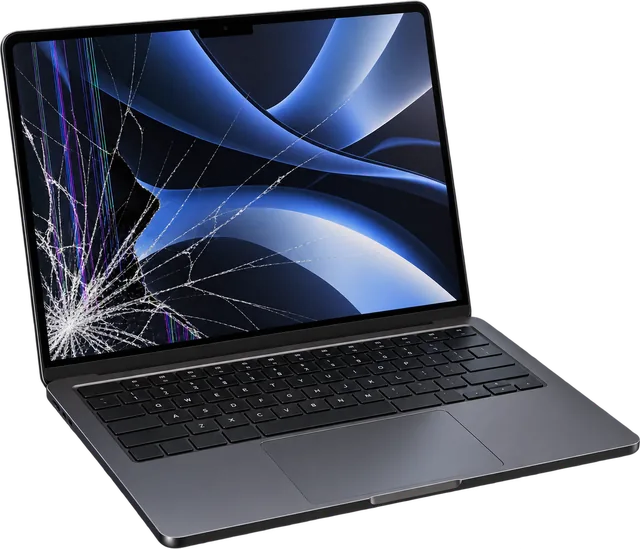
Screens

MacBook Screen Repair in Ruislip

We replace cracked, dead and flickering screens on MacBook Air and MacBook Pro, from the Retina models of 2012 to current Apple silicon. Most screen replacements take 1 to 2 days, because we order the exact display for your model once we've confirmed what it is. Prices start at £119.

  • Cracked or shattered display
  • Ink blots or black patches spreading across the LCD
  • Lines, bands or flickering
  • Backlight faults, where the picture is there but very dark
  • A display that cuts out when you move the lid
  • Damage from a drop or something left on the keyboard when the lid closed

Model matters with screens. If you've identified your MacBook as an A2337 MacBook Air and the display is cracked or showing lines, we confirm the exact panel before ordering. The M2 and later 13 inch Air, the A2681 onwards, uses a larger 13.6 inch display, so the parts aren't interchangeable. On 14 and 16 inch MacBook Pros such as the A2442 and A2485, the mini LED display is a more expensive part, so we always quote after checking.

Most of the screens we fit are high quality replacement displays rather than Apple originals. We tell you the grade and the price before anything is ordered, and we test brightness, colour, the camera and the lid sensor before you collect.

From £1191 to 2 days · 3 month warranty
WhatsApp us

Common question

My MacBook screen is black. Do I definitely need a new screen?

Not necessarily. A black screen has several causes that look the same from the outside: a failed backlight, a damaged display cable, a fault on the logic board, or a MacBook that isn't actually starting.

Two quick checks tell you a lot. Shine a torch close to the screen: if you can faintly see the desktop, the panel is alive and the backlight isn't. Then plug the MacBook into a TV or monitor. If a picture appears there, the MacBook is running and the fault is in the display side.

We run these tests and more for free before quoting, so you only pay for a screen when it really is the screen.

Batteries

MacBook Battery Replacement

Every MacBook battery wears with use. Apple rates recent MacBook batteries for 1,000 full charge cycles, and as a battery gets older you'll notice shorter runtime, sudden shutdowns at 20 or 30 percent, or a Service Recommended warning. We replace MacBook Air and MacBook Pro batteries for £89, usually the same day.

What does Service Recommended mean on a MacBook?

macOS shows Service Recommended when the battery holds noticeably less charge than it did new, or when it reports a fault. The MacBook keeps working, but you'll get less time away from the charger and it may switch off early under load. It's the clearest sign that a new battery is due.

How to check your battery cycle count

Hold the Option key, click the Apple menu and choose System Information. Select Power and look for Cycle Count and Condition. Anything near 1,000, or a condition other than Normal, is worth a conversation.

On models like the A2337 MacBook Air and the A2338 MacBook Pro, the battery cells are glued into the case, so this is a workshop job rather than a quick swap. We remove the old battery safely and fit the new one, in most cases the same day.

£89Usually same day · 3 month warranty
WhatsApp us

Signs of a swelling battery

  • The trackpad has become hard to click, or clicks by itself
  • The MacBook rocks on a flat desk
  • A gap has opened along the bottom case

Stop charging it, don't press on it, and bring it in. A swelling battery is not something to leave for later.

Keyboards & trackpads

MacBook Keyboard & Trackpad Repair

Keys that don't respond, repeat or stick, a keyboard macOS doesn't see, or a trackpad that won't click. We start by finding out whether it's really the keyboard, because a loose cable, liquid traces or a swollen battery can cause the same symptoms.

⌨️

How we replace keyboards

When a keyboard has failed, we replace it as a complete keyboard using original Apple keyboards, pre owned and taken from other MacBooks. We explain this before any work and you decide. It's a bigger job than it sounds: the keyboard is fitted from inside the top case, so most of the MacBook comes apart. That's why it takes 2 to 3 days.

🦋

Butterfly keyboard models

MacBook Pros from 2016 to 2019 (except the 16 inch 2019) and the 2018 to 2019 MacBook Air used Apple's butterfly keyboard, known for keys that stop working or type twice because of dust under the keys. If you have an A1706, A1708, A1989 or A1932 with those symptoms, that's very likely what's going on.

🖱️

Trackpad faults

A trackpad that won't click, clicks all over, ignores your finger or sends the cursor jumping can be the trackpad, its cable, or a battery swelling underneath and pushing it up. We check the battery first, because that one shouldn't wait.

Keyboard problems show up across every MacBook generation. If you're looking for an A2337 keyboard replacement because several keys have stopped responding, we check first whether the keyboard itself is responsible. On the M1 Air, a spill often affects the keyboard and the logic board together, and it's better to know that before paying for either.

From £792 to 3 days · 3 month warranty
WhatsApp us

Charging

MacBook Not Charging? USB-C and MagSafe Repair

A MacBook that won't charge has a handful of usual causes, and the port isn't always to blame: a failed charger or cable, debris in the port, a worn port, a fault in the charging circuit on the logic board, or a battery that no longer accepts charge.

Try this first

  1. Use a different wall socket and leave it plugged in for 15 minutes.
  2. Try another charger made for MacBooks, or a cable you know works.
  3. Try each USB-C port in turn.
  4. Shine a torch into the port. Fluff and grit stop the plug seating fully.
  5. Check System Settings, then Battery, for any messages.

What the clues usually mean

Charges on one port but not another
That port, or the circuit behind it on the board.
Only charges at a certain angle
Debris in the port or a worn connector.
No charge on any port or charger
Battery, charging circuit or logic board. Needs testing.
MagSafe light doesn't come on
The cable, the MagSafe port or the board.

Which charging does my MacBook use?

MagSafe 3 and USB-C

14 and 16 inch MacBook Pro from 2021, and MacBook Air from the M2 (A2681) onwards. Either port can charge it.

USB-C only

MacBook Pro from 2016 to 2020, the 13 inch M1 and M2 MacBook Pro (A2338), and MacBook Air from 2018 to the M1 (A2337).

MagSafe 2

Retina MacBook Pro from 2012 to 2015 (A1398, A1502) and the 13 inch MacBook Air from 2012 to 2017 (A1466).

Free checkQuote before any work
WhatsApp us

Liquid damage

Spilled Liquid on Your MacBook?

Water, coffee and juice leave minerals and sugar on the logic board. With power present they corrode connections, and the damage can keep spreading for days after the spill, even when the MacBook seemed fine at first.

We open it up, assess the board and components, clean the affected areas, and tell you honestly what we found. We can't promise every liquid damaged MacBook can be repaired, or that data can be recovered, but the sooner we see it the better the chances.

From £69Liquid damage clean · 2 to 4 days
From £99Data recovery · 3 to 5 days
WhatsApp us

What to do right now

  1. Switch it off. Hold the power button until the screen goes black.
  2. Unplug everything, the charger first.
  3. Turn it over. Open the lid wide and stand it keyboard down on a towel so liquid runs out, not further in.
  4. Don't keep trying to turn it on, and don't plug the charger in to check.
  5. No hairdryer or heat. It can push liquid deeper and warp parts.
  6. Skip the rice. It doesn't draw liquid out of a laptop and leaves dust behind.
  7. Bring it in as soon as you can, even if it seems fine.

No power & logic board

MacBook Won't Turn On? Logic Board Diagnosis and Repair

A MacBook with no sign of life isn't automatically a logic board fault. We work through it in order: the charger and power supply, the battery, the charging circuit, then the board itself.

  • Won't turn on at all
  • No response when the charger is connected
  • Fans or sound, but no picture
  • Random shutdowns
  • Faults that started after a spill

When the board is at fault, we repair it at component level in our own workshop on Ruislip High Street, fixing the failed part of the board rather than replacing the whole thing where that's possible. Board repairs can take up to 5 days, and we quote after diagnosis. If we can't fix it, you don't pay.

On MacBooks from recent years, including every Apple silicon model, the storage is built into the logic board. That means a board repair is often the only way to get files back from a MacBook that won't start.

Quote after diagnosisUp to 5 days · No fix, no fee
WhatsApp us

Is Your MacBook Worth Repairing?

Three questions and you'll get our honest first view. It's guidance, not a valuation. We confirm everything when we see the MacBook.

Repair

Get a trade in valuation

How we think about repair or replace

  • Software support. Apple silicon MacBooks still get the latest macOS. Intel MacBooks stop at macOS Tahoe 26 or earlier, and the oldest no longer get security fixes at all.
  • Cost against value. A £89 battery in an M1 MacBook Air is almost always worth it. A logic board repair on a 2015 MacBook Pro often isn't.
  • Everything else. A MacBook with a worn battery, a tired keyboard and a cracked screen adds up quickly. We'll tell you if the total stops making sense.
  • Your files. Sometimes the repair is worth doing just to get your data back, even if you replace the MacBook afterwards.

If replacing makes more sense, we buy MacBooks, working or broken, for up to £550 and pay the same day. Sell your MacBook.

MacBook Repair Prices in Ruislip

Starting prices for MacBook Air and MacBook Pro. We confirm the exact price for your model after a free check, and nothing starts without your approval.

Screen replacementfrom £1191 to 2 days
Battery replacement£89Usually same day
Keyboard or trackpadfrom £792 to 3 days
Liquid damage cleanfrom £692 to 4 days
Data recoveryfrom £993 to 5 days
Logic board repairQuotedAfter diagnosis, up to 5 days
Charging and portsQuotedAfter diagnosis
DiagnosisFreeUsually within the hour

How a MacBook Repair Works With Us

  1. 1Free diagnosis

    We test the MacBook and find the cause, usually within the hour for straightforward faults.

  2. 2You approve the quote

    You get the price and the timescale first. No work starts until you say yes.

  3. 3The right part

    Screens and batteries are matched to your exact model number before ordering. Board work happens in house.

  4. 4Full test

    Display, keyboard, trackpad, ports, battery, camera, speakers and Wi-Fi are all checked before you collect.

  5. 53 month warranty

    Every repair is covered for 3 months. If the same fault comes back, bring it in.

Visiting Us for a MacBook Repair in Ruislip

Tech Fix and Trade is an independent repair shop at 68 High Street, Ruislip, HA4 7AA, part of the Fon Fix 4 U group. You don't need an appointment. Walk in Monday 9:30am to 5:30pm, Tuesday to Friday 9am to 5:30pm, or Saturday 10am to 3pm, and we'll look at your MacBook while you're there.

What to bring

  • The MacBook, and its charger. The charger helps us tell a charger fault from a MacBook fault.
  • Your login password, or be ready to sign in when you collect, so we can test everything works.
  • A backup, if it still turns on. Screen and battery work doesn't touch your files, but it's good practice.

Can't get to Ruislip? We offer pick up and delivery. Ask on WhatsApp and we'll arrange it.

MacBook repairs checked by Furqan, our MacBook technician.

Tech Fix and Trade

68 High Street, Ruislip, HA4 7AA

Mon 9:30am to 5:30pm, Tue to Fri 9am to 5:30pm · Sat 10am to 3pm

MacBook Repair Questions

How much does a MacBook screen replacement cost in Ruislip?

MacBook screen replacement starts from £119 at Tech Fix and Trade, 68 High Street, Ruislip, and usually takes 1 to 2 days while we order the exact display for your model. Larger and mini LED displays on 14 and 16 inch MacBook Pros cost more, so we confirm the price after a free check.

How long does a MacBook battery replacement take?

Usually the same day. A MacBook Air or MacBook Pro battery replacement costs £89 and comes with a 3 month warranty.

What MacBook is A2337?

A2337 is the MacBook Air (M1, 2020). It has a 13.3 inch display, Apple's M1 chip, charges over USB-C and has the Model Identifier MacBookAir10,1. It still gets the latest version of macOS.

Where is the model number on a MacBook?

Turn the MacBook over and look at the small grey print along the edge nearest the hinge. The model number is the A followed by four numbers, for example A2337. If the MacBook still starts, About This Mac in the Apple menu shows the name and year.

Can I identify a MacBook that won't turn on?

Yes. The model number printed underneath works without power. If one number covers more than one year, the serial number underneath will narrow it down, or bring it in and we'll identify it for you.

Do you use genuine Apple parts?

For keyboards, yes: we fit original Apple keyboards that are pre owned, and we explain that before any work. Most screens we fit are high quality replacement displays, and we tell you the grade before ordering. Tech Fix and Trade is an independent repair shop and isn't affiliated with Apple.

Will I lose my files during a MacBook repair?

Screen, battery, keyboard and trackpad repairs don't touch your storage. Liquid damage and logic board repairs carry more risk, so back up first if the MacBook still works.

Is my MacBook still supported by Apple?

Every Apple silicon MacBook, M1 and newer, runs macOS 27, released in September 2026. Intel MacBooks can't run it: the 16 inch 2019 and four port 13 inch 2020 MacBook Pro stop at macOS Tahoe 26, other 2018 to 2020 Intel models stop at Sequoia 15, and older ones no longer get updates.

Do you buy MacBooks?

Yes. We buy MacBook Air and MacBook Pro, working or broken, for up to £550 depending on the model and condition, and pay the same day.

Not sure what's wrong with your MacBook?

Bring it in for a free diagnosis, or send us the model number and the problem on WhatsApp. You'll get a straight answer and a price before anything is done.

WhatsApp us

What Our Customers Say

Real reviews, direct from Google

Loading reviews...