PS5 Slim Repair in Ruislip – HDMI Port, No Signal & Power Faults
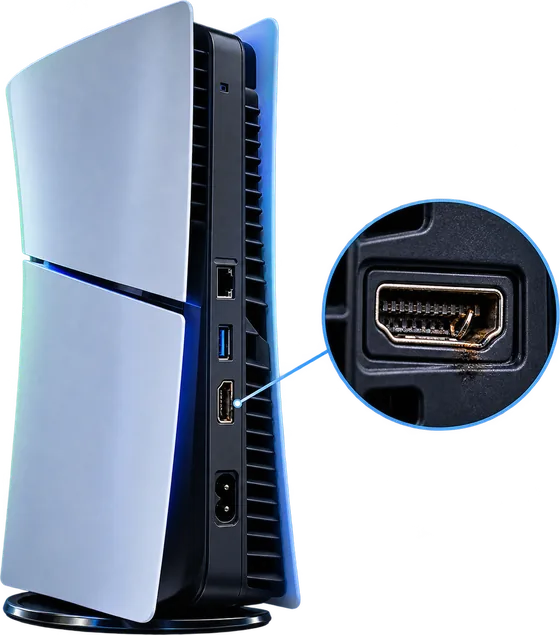
No picture on the TV, a damaged HDMI port, a console that won't switch on or a fan that sounds like it's taking off? Tech Fix and Trade diagnoses and repairs the PS5 Slim, Disc and Digital Edition, at 68 High Street, Ruislip. Diagnosis is free, and HDMI port repairs booked in before 12 are usually finished the same day.
- No signal
- Damaged HDMI port
- Won't turn on
- Overheating
- Loud fan
- Disc drive faults
- USB ports
- Liquid damage
Free diagnosis · No fix, no fee · Message us on WhatsApp
- 🔬Free diagnosis
- 🛡️No fix, no fee
- 📺HDMI same day, in before 12
- ✅3 month warranty
- 🚗Collection available
PS5 model check
Which PS5 Slim Do You Have?
Every PS5 has a model number starting with CFI on the label underneath. Type it in to see which console you have and whether it was sold as a Disc or Digital Edition.
PS5 Slim model numbers sold in the UK
The letter after the number on the box tells you how it was sold: A means it came with the disc drive, B means Digital Edition. CFI-1016, CFI-1116 and CFI-1216 are the original, larger PS5, repaired on our PS5 page. CFI-7021 and CFI-7121 are the PS5 Pro.
PS5 Slim Disc vs Digital: what's actually different?
On the PS5 Slim the only difference is the detachable disc drive. The Disc Edition comes with Sony's drive clipped on. The Digital Edition doesn't have one, but you can add Sony's Disc Drive later and it becomes a disc console. The drive needs an internet connection the first time it's paired with a console, which matters if a drive is replaced or moved to another PS5.
What's Wrong With Your PS5 Slim?
Pick the closest match. You'll see what can cause it and what we'd check. These are possibilities, not a diagnosis: several faults can cause the same symptom, and inspection is what confirms it.
Display
PS5 Slim turns on but shows no signal
Several faults can cause this. It can sometimes be the HDMI cable or the TV input, a damaged HDMI port, or a fault in the HDMI circuit on the board. Try another cable and input first, then Safe Mode. Inspection is required to confirm which it is.
HDMI
PS5 Slim HDMI port looks damaged
If the port is visibly bent, cracked or has pins pushed in, a replacement port is the likely repair. We still check the board around it, because a hard knock can damage more than the port.
HDMI
HDMI cable loose or picture cutting out
A loose fit can be a worn cable plug or a worn or damaged port. If the picture flickers when the cable moves, try a new cable before anything else. If it's the same with a good cable, the port is the likely suspect.
Power
PS5 Slim won't turn on
This can sometimes be caused by the internal power supply, the power delivery on the board, or another board fault. A faulty wall socket or extension lead catches people out too, so try a different socket with the power cable on its own.
Power
PS5 Slim turns on then shuts off
Heat protection is a common reason, especially if it happens after a while. A power supply or board fault can do the same thing, often within seconds of starting. We test it under load to see which.
Cooling
PS5 Slim overheating
Dust in the fan and heatsink is the most common cause we see, along with poor airflow around the console. We check the cooling properly rather than assuming every hot console just needs a clean.
Cooling
PS5 Slim fan very loud
A fan that roars in menus is usually working hard against dust or heat. Rattling or grinding is different and can point to a worn fan. Either way, an inspection tells us which.
Disc drive
PS5 Slim won't read discs
Try a few discs. If none work, the drive's laser or its connection to the console could be at fault. A Digital Edition with an added Disc Drive can show the same symptom.
Disc drive
Disc stuck in PS5 Slim
Don't force it. A worn mechanism or something lodged in the slot is often the cause, and we can usually get the disc out without damage.
Ports
PS5 Slim USB port not working
A loose or dead USB port can be worn, bent or blocked. Try another cable and port first. Sometimes a clean is enough, sometimes the port needs replacing.
Controller
Controller won't connect to the PS5 Slim
It can be the controller's battery or port, a pairing problem, or occasionally the console's Bluetooth. Connect it with a USB cable to see if it pairs. Bring both in if it still won't.
Network
PS5 Slim Wi-Fi or network problem
Most network problems are settings or the router, so test with a network cable if you can. If wired works and wireless doesn't, the console's wireless hardware is worth checking.
Liquid
Liquid spilled on a PS5 Slim
Unplug it now and don't switch it on. Liquid can corrode the board, and powering it up can make things worse. Bring it in as soon as you can for an inspection. We can't promise every liquid damaged console can be saved.
Other
Something else wrong with your PS5 Slim
Stuck on startup, error messages, strange noises or a fault that comes and goes. Describe it on WhatsApp and we'll tell you what a check involves.
A symptom isn't a diagnosis
People often arrive sure they know which part has failed. Sometimes they're right. Often the same symptom has a different cause, and replacing the wrong part costs money without fixing anything.
- "No signal"HDMI port replacementIt can be the cable, the TV input, the port, or the HDMI circuit on the board.
- "Won't turn on"Power supply replacementIt can be the power supply, a protection shutdown, or a fault on the main board.
- "Overheating"New fanUsually it's dust and blocked airflow. A worn fan is far less common.
HDMI and no signal
PS5 Slim HDMI Port Repair in Ruislip
The HDMI port on the PS5 Slim is soldered to the main board, so it can't be unplugged and swapped. Replacing it means removing the damaged port and soldering a new one in its place, which is board level work we do in our own workshop on Ruislip High Street. HDMI port replacement starts from £65, and if you book the console in before 12 it's usually ready the same day.
Signs the HDMI port may be damaged
- The port looks bent, cracked or pushed in
- Pins inside the port are bent or missing
- The HDMI cable feels loose or won't sit straight
- The picture cuts in and out when the cable moves
- No picture after the console or the cable was knocked
- The console powers on, but the TV gets no usable picture
None of these prove the port needs replacing on its own. They tell us where to look first.
From our workshop
No signal: is the HDMI port actually broken?
Not necessarily. A PS5 Slim with no picture can have several different causes, and from the outside they all look the same: a faulty HDMI cable, the wrong TV input or settings, a physically damaged port, a fault in the HDMI circuit on the board, or another board or software fault.
It happens in the shop: a console comes in for a "broken HDMI port", and under inspection the port is fine. The pins are straight and secure, and the fault is further back on the board. Fitting a new port wouldn't have fixed it. That's why we inspect and test before recommending an HDMI port replacement, and you only pay for the repair that's actually needed.
The fault can sit anywhere along this path. Diagnosis finds which one.
Before you bring it in
- Try another HDMI cable you know works, ideally the one that came with the console.
- Try another HDMI input on the TV, or a different TV or monitor.
- Look into the port with a torch. Check for bent, pushed in or missing pins, but don't poke anything inside.
- Check the console powers on: the light comes on and you can hear it running.
- Try Safe Mode. With the console off, hold the power button and let go after the second beep, about 7 seconds. Connect the controller with a USB cable, press the PS button, then choose Change Video Output to lower the resolution or change HDCP mode.
Power
PS5 Slim Won't Turn On?
A PS5 Slim that won't start, or starts and then cuts out, can have several causes, and it isn't automatically the power supply. The Slim's power supply sits inside the console, so the cause can be the supply itself, the power delivery on the board, a protection shutdown triggered by heat, or a fault elsewhere on the main board.
- Completely dead, no light and no sound
- Beeps but doesn't start
- Starts, then shuts down after a few seconds
- Switches off by itself during play
Try a different wall socket and the power cable on its own, without an extension lead. If nothing changes, we test the power supply and the board first, then quote. No fix, no fee.
Why does my PS5 Slim turn off by itself?
The most common reason is heat: the console protects itself when it can't cool down, often because of dust or poor airflow. A failing power supply or a board fault can cause it too. If it shuts down even when it's cool and idle, heat is less likely.
Is it worth fixing a dead PS5 Slim?
Usually, yes. The Slim is a current console, so even a board level repair often costs far less than replacing it. We tell you the price before any work, and if it isn't worth it, we'll say so.
Heat and noise
PS5 Slim Overheating or Loud Fan?
Cleaning is one of the jobs we do most on the PS5 Slim. Dust builds up in the fan and heatsink over time, the fan works harder, it gets louder, and eventually the console warns you about temperature or shuts down mid game.
- The console feels much hotter than it used to
- A temperature warning on screen
- The fan roars even in menus
- Shutdowns during demanding games
- Stuttering that gets worse the longer you play
Dust isn't the only cause, so we check the fan, airflow and cooling before recommending anything. Where the console lives matters too: a closed cabinet or a spot against a wall traps hot air, so give it space around the vents.
Disc drive
PS5 Slim Disc Drive Problems
This applies to the Disc Edition, and to a Digital Edition with Sony's Disc Drive added. A Digital Edition on its own has no drive to go wrong.
Won't read or recognise discs
It can be a dirty or scratched disc, a laser that's wearing out, or a connection problem between the drive and the console. Try a few different discs first: if one works and another doesn't, the disc is the likely problem.
Disc stuck, won't insert or eject
Don't force a stuck disc or pull at it with tools, as that's how drives get damaged. A worn mechanism or a foreign object in the slot are common causes, and we can usually get the disc out safely.
Grinding or clicking noises
Loud grinding or repeated clicking while loading points to a mechanical problem in the drive. Stop using it if it gets worse, because a failing drive can scratch discs.
We repair the PS5 Slim's detachable drive, and replace it when it can't be repaired. Sony's drive pairs with the console over the internet the first time it's attached, so you'll need a connection when a replacement drive is set up.
Ports
PS5 Slim USB Port Problems
The PS5 Slim has two USB-C ports on the front and USB ports on the back. A port that's loose, damaged or no longer sees your controller or drive can be a worn port, a bent connector, or something lodged inside.
- Controller won't charge from the front port
- External drive or accessory not recognised
- The plug feels loose or only works at an angle
Try another cable and another port first. If one port works and another doesn't, that narrows it down. A port replacement isn't automatic: sometimes a clean or a straightened connector is enough.
Other PS5 Slim faults we can diagnose
- Controller won't connect or has stick drift
- Bring the controller with the console. We check whether it's the controller, its battery or the console.
- Liquid spilled on the console
- Unplug it straight away and don't switch it on. Liquid can corrode the board, so the sooner we see it, the better.
- Wi-Fi, Bluetooth or network problems
- Often settings or the router, sometimes hardware. We check both.
- Stuck on startup or storage errors
- Safe Mode can help with software faults. If it doesn't, we test the hardware.
Is Your PS5 Slim Worth Repairing?
Four quick questions for an honest first view. It's guidance, not a valuation. We confirm everything when we've seen the console.
Repair
If repairing doesn't make sense, we buy PS5 Slim consoles, working or faulty, and pay up to £350 for a working one, the same day. Sell your PS5 or see everything we buy and sell.
How a PS5 Slim Repair Works With Us
- 1Tell us the fault
Message us the model number and what's happening, or just walk in.
- 2Bring it in
The console and its HDMI cable. For HDMI repairs, before 12 gives us the best chance of same day.
- 3Free diagnosis
We inspect the console and test to find the actual cause.
- 4You approve
We tell you what's wrong and the price. Nothing starts until you say yes.
- 5Repair and test
Picture and sound, ports, disc drive and temperature are checked before it leaves.
- 6Collect
Pick it up in Ruislip or use our paid collection and return. 3 month warranty.
Visiting Us for a PS5 Slim Repair in Ruislip
Tech Fix and Trade is an independent repair shop at 68 High Street, Ruislip, HA4 7AA, part of the Fon Fix 4 U group. We're not a Sony or PlayStation authorised service centre. We diagnose and repair consoles in our own workshop, and you don't need an appointment.
What to bring
- The console
- Its HDMI cable, so we can rule the cable in or out
- The controller too, if the fault involves it
Can't get to us? We offer collection and return for a charge depending on distance. Ask on WhatsApp.
Console repairs carried out by Saqlain.
68 High Street, Ruislip, HA4 7AA
Mon 9:30am to 5:30pm, Tue to Fri 9am to 5:30pm · Sat 10am to 3pm
PS5 Slim Repair Questions
How much does a PS5 Slim HDMI port repair cost in Ruislip?
PS5 Slim HDMI port replacement starts from £65 at Tech Fix and Trade, 68 High Street, Ruislip, with a 3 month warranty. We inspect the console free first to confirm the port is the problem before you pay for anything.
Can a PS5 Slim HDMI port be replaced?
Yes. The port is soldered to the main board, so the old port is removed and a new one soldered in its place. It's board level work we do in our own workshop, usually the same day if the console is booked in before 12.
Can a PS5 have no signal even if the HDMI port looks fine?
Yes. No signal can come from the cable, the TV input or settings, or a fault in the HDMI circuit on the board, even when the port itself is undamaged. That's why we diagnose before replacing anything.
How do I find my PS5 Slim model number?
It's on the label on the bottom of the console when it stands upright. Remove the stand if it's fitted. The model number starts with CFI, for example CFI-2016. The serial number is a separate, longer number.
What's the difference between the PS5 Slim Disc and Digital Edition?
The Disc Edition comes with Sony's detachable disc drive attached and the Digital Edition doesn't. You can add the Disc Drive to a Digital Edition later. It needs an internet connection the first time it's paired with the console.
Can a liquid damaged PS5 Slim be repaired?
Often, if it's unplugged straight away and not switched on again. Liquid corrodes the board over time, so bring it in as soon as you can. We inspect it, tell you honestly what we find, and can't promise every console can be saved.
Is Tech Fix and Trade a Sony authorised repair centre?
No. We're an independent repair shop in Ruislip. We diagnose and repair PS5 consoles in our own workshop with a 3 month warranty on repairs.
Do you buy PS5 Slim consoles?
Yes. We pay up to £350 for a working PS5 Slim, buy faulty consoles too, and pay the same day.
Not sure what's wrong with your PS5 Slim?
Bring it in for a free diagnosis, or message us the model number and the problem. You'll get a straight answer and a price before anything is done.
What Our Customers Say
Real reviews, direct from Google